In 1985 Peter Naur argued that a program lives in the heads of the people who built it. In his account, the program’s death “happens when the programmer team possessing its theory is dissolved.” The code can keep running after that. The loss shows up later, when someone needs a change and nobody left can say which changes are safe. Naur didn’t think reading the code and the documentation was enough to recover it.
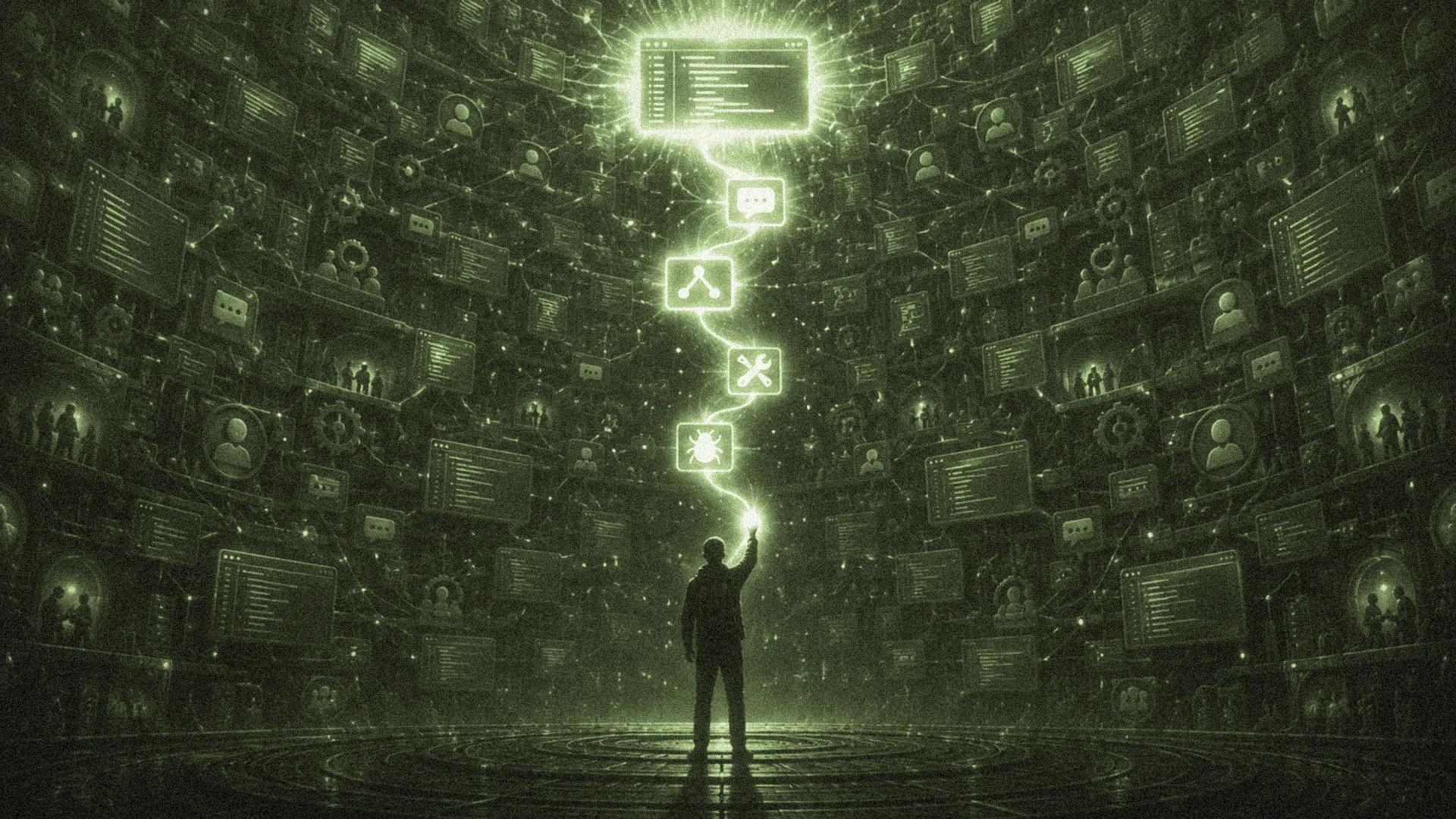
Some of what those people knew does leave a trail: the pull request that changed a file, the failure that prompted it, the decision taken afterward, the agent session that wrote the patch. The pieces sit in different tools, and the links between them are usually only in someone’s memory. A world model writes those links down and keeps them up to date.
- Entities: code is one kind of node. Issues, patterns, pull requests, fixes, decisions, sessions, tasks, people and product areas are the others.
- Edges: a link is useful when it has a type and a direction. fixed_by answers a question that “related” can’t.
- Evidence: a link should say what it rests on. When nothing was recorded, the model should show the gap.
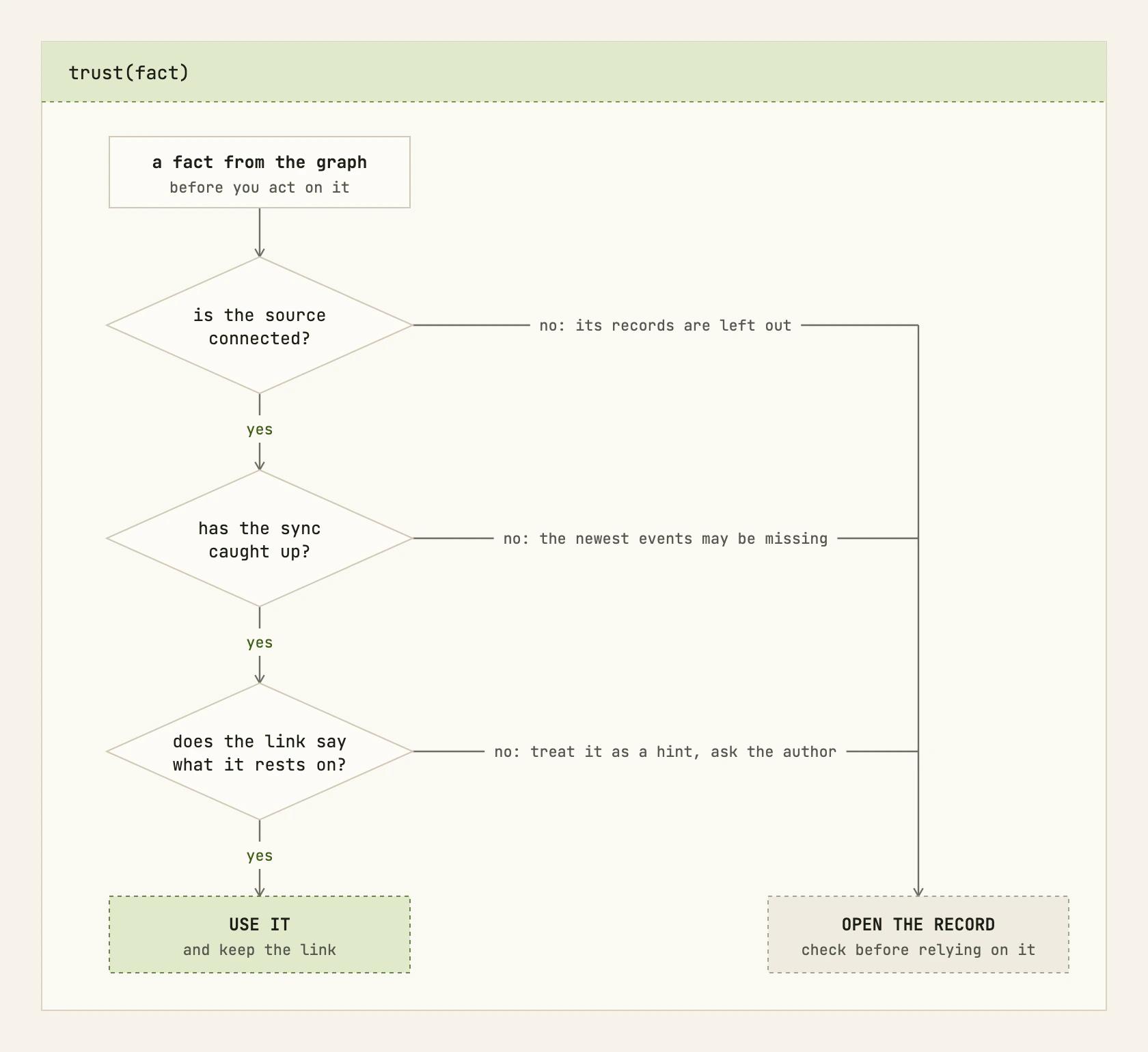
- Freshness: sources sync at different speeds, so a fact is only as current as the connector behind it. Check that before you act on it.
What is a world model of a codebase?
A world model of a codebase is a graph of the code and the work around it, kept current as both change. A code index can tell you what a function calls. A world model also holds which failure hit that code, which pull request was flagged for it, and what the team decided after the fix.
In Entelligence it is one graph of the code, the pull requests, the review threads, the incidents and the sessions your agents run, and the products read from that index. Ask Ellie answers from the same graph, so you can ask a question or browse the graph yourself. In the app it opens as a globe. Here is ours:
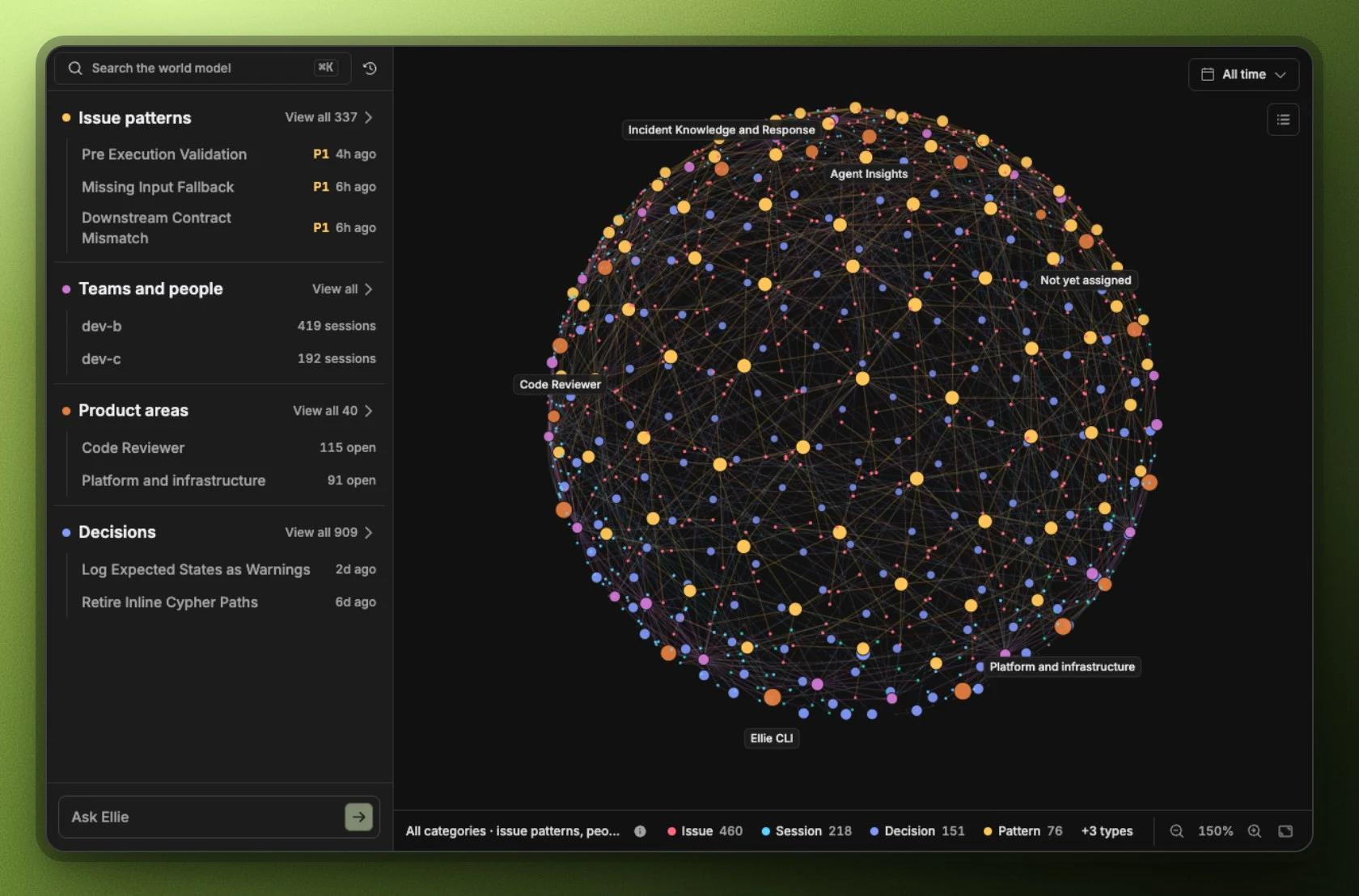
The footer counts are what the globe draws. It shows 151 decisions while the list on the left has 909, and by default it draws only the costliest few hundred agent sessions. Read it as a partial map, and use the lists when you need a total.
The entities: code is one node among ten
We opened nodes in our own workspace and wrote down what they connected to. Ten kinds of entity came up. Pull requests, sessions, tasks, people and product areas are what they sound like. The other five need a definition:
| Entity | What it stands for |
|---|---|
| Code location | A file that something happened in. An issue can also name the function it is attributed to. |
| Issue | One failure, with a severity and a detection count. |
| Issue pattern | A group of issues that fail in a similar way. |
| Fix | An attempt to resolve an issue, including ones marked inconclusive. |
| Decision | A rule recorded from earlier work, and the files it applies to. |
Someone has to choose what counts as an entity. If a decision were only a paragraph inside a pull request, you could find it by searching for the pull request. As a node of its own, it can be reached from any file it applies to, by someone who has never heard of that pull request.
The edges: a link needs a type and a direction
In the nodes we opened, we saw 14 types of edge between those entities. The full list may be longer.
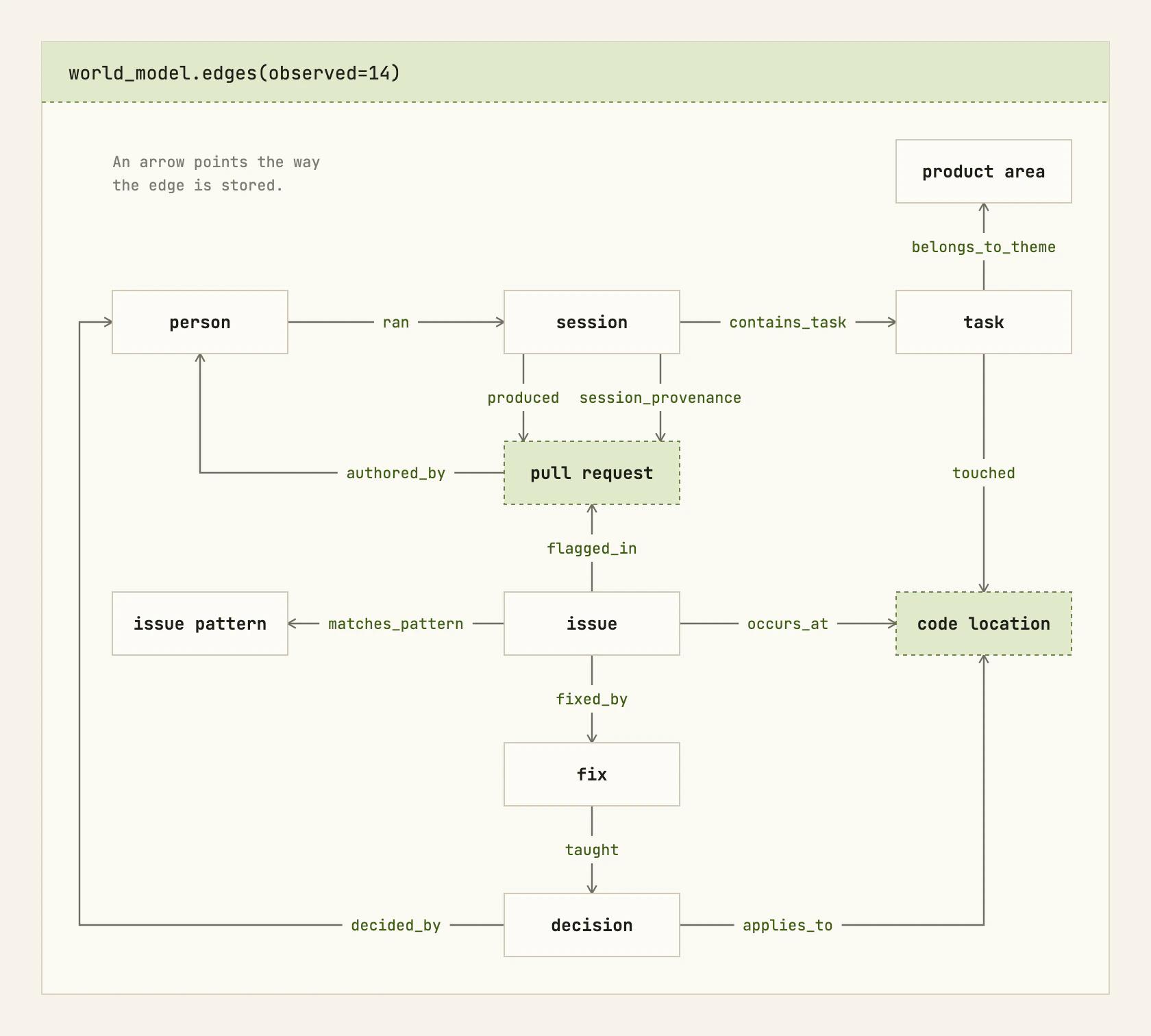
Similarity search can tell you that a file and an issue are alike. A typed edge makes a claim you can check: this issue occurs_at that file, this fix taught that decision. If it is wrong, you know which edge is at fault.
Here is one issue from our backend, Null LLM Response String Access. A model call returned nothing and the code treated the result as a string. It has been detected 66 times and flagged on 7 pull requests.
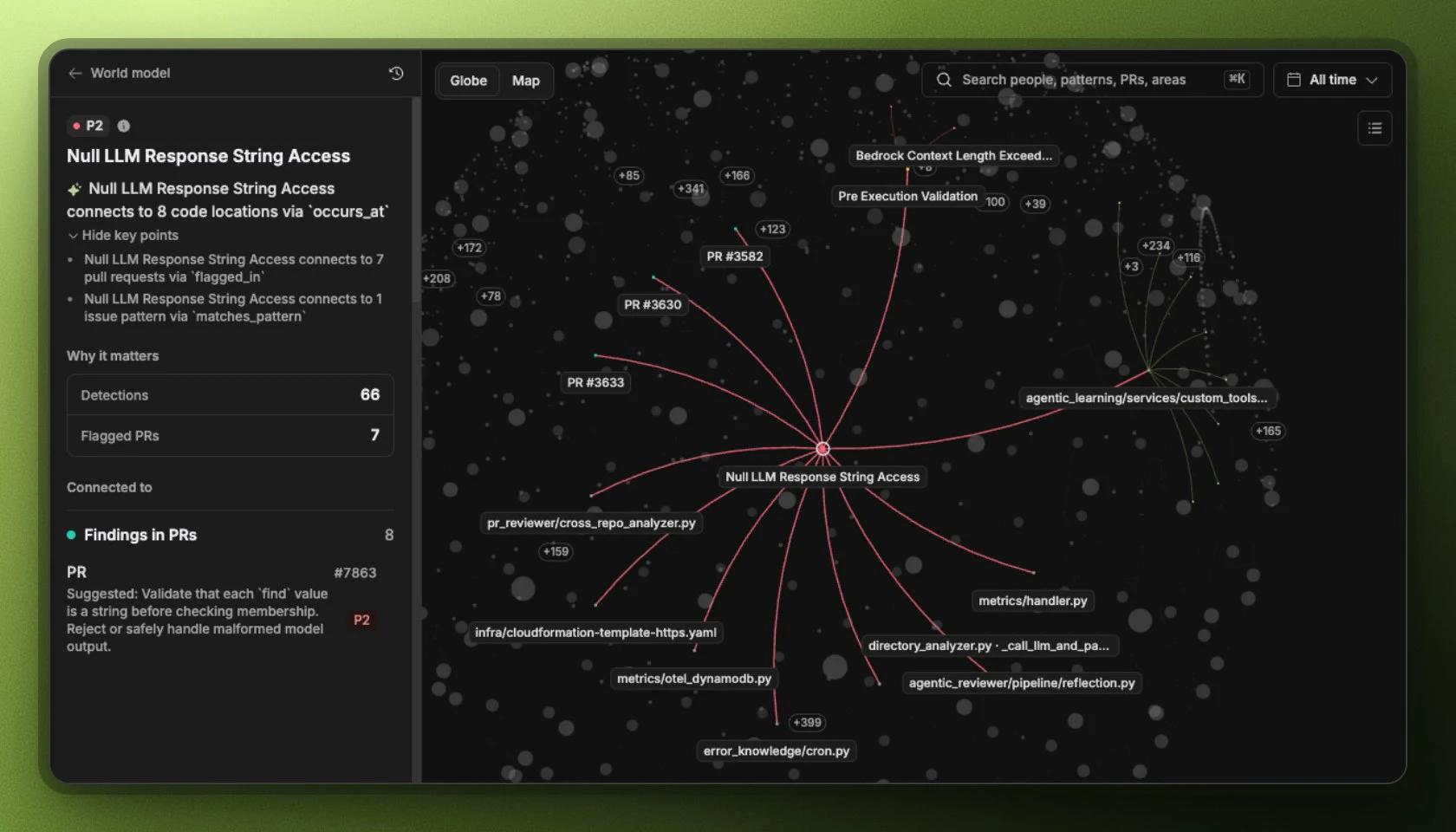
The eight locations include the PR reviewer, the review pipeline, metrics and an infrastructure template. Someone fixing this from a single stack trace might only find one of them. The issue is also one of ten in a pattern called Pre Execution Validation, so the other nine can be reached through it. The pattern as a whole has been detected 16,180 times. Our last post covers how patterns reach code review.
Following edges to an answer
To answer a question, start at one entity and follow the edges that bear on it. Here are three examples:
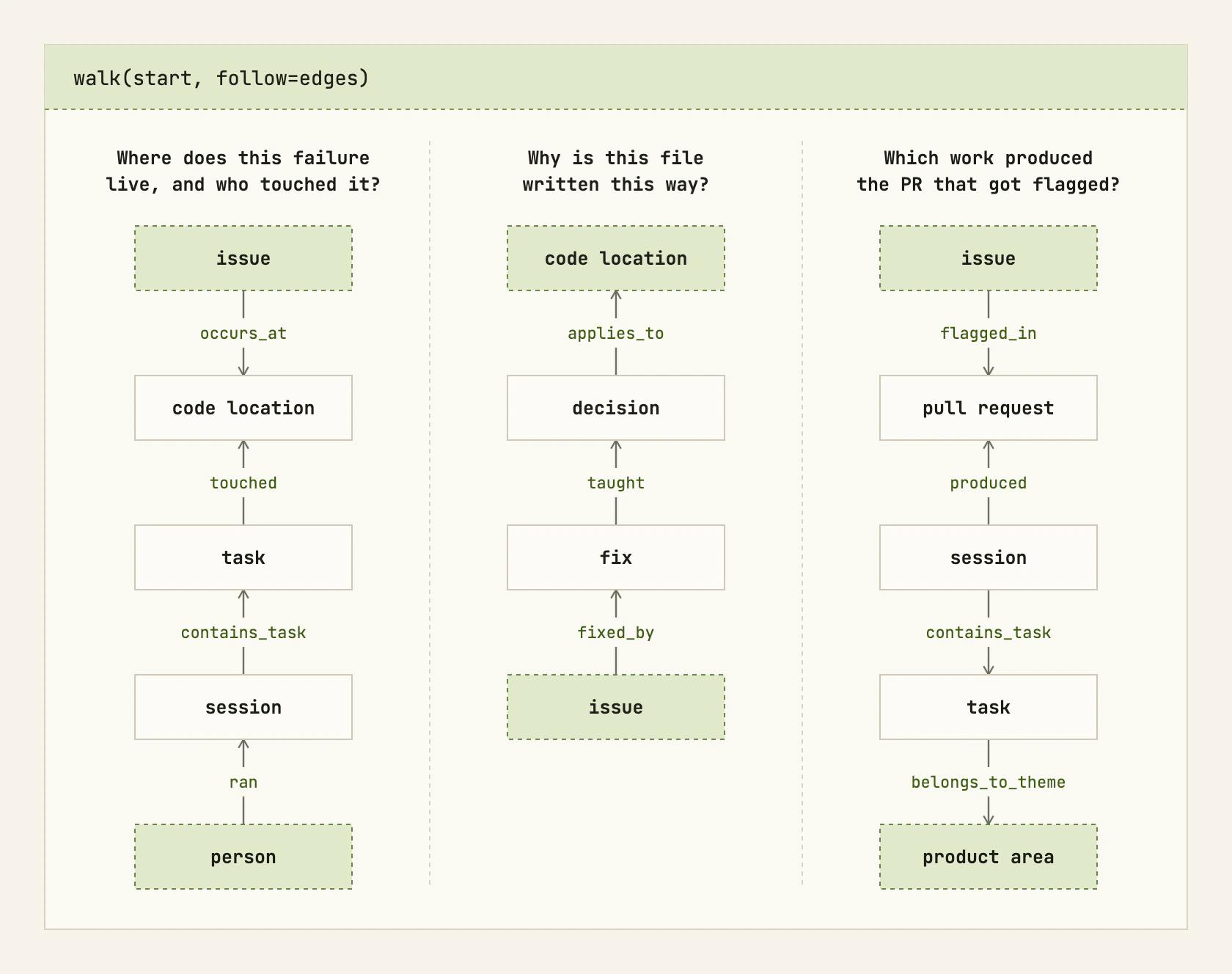
The second path gets closest to what Naur thought was lost. Take the file agent_insights/health.py. One of the decisions pointing at it is Retire Inline Cypher Paths: stop writing graph queries inline and use named ones. It was learned from a fix in PR #7540 and applies to five files.
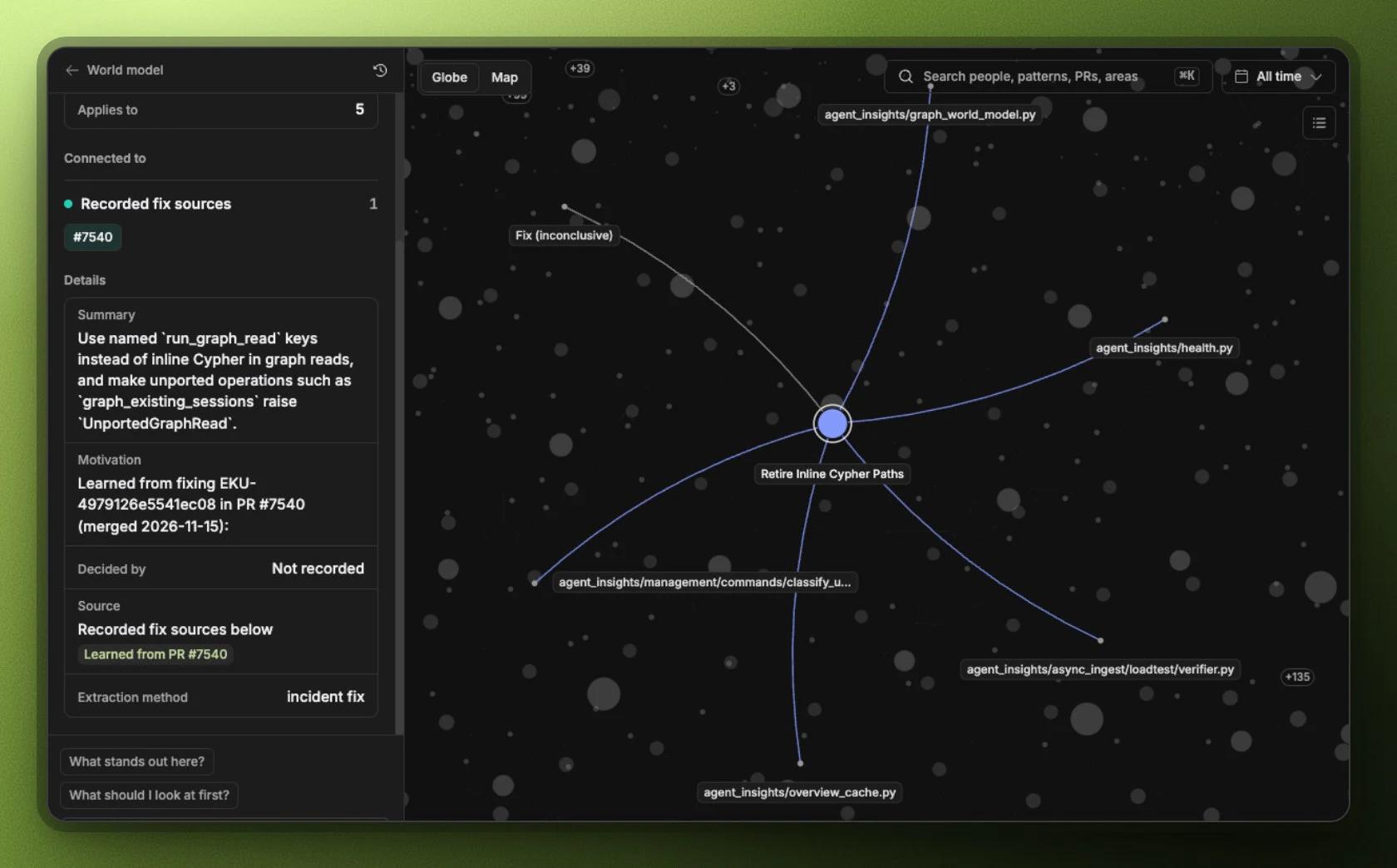
An engineer or an agent about to add an inline query to that file can find the rule without knowing PR #7540 exists. The reasoning that never reached a pull request is still missing, and no graph will recover it.
You don’t have to walk every path by hand. Ask Ellie is inside the World Model: ask about the node you have open, and the globe lights up each node Ellie visits while it searches. It works from the full-page Ask Ellie chat too, where answers from the World Model show the nodes they cited and an Open in World Model link. Starter questions are answered from fixed graph queries and skip the planning step.
How the graph shows what it doesn’t know
Two details of that decision matter as much as the rule. Decided by reads “Not recorded”, and the fix it is connected to is marked “inconclusive”. A graph that filled in the most likely engineer would look more complete and would sometimes be wrong. You can’t spot that kind of error by reading the answer.
The same goes for edges. “This session produced that pull request” might be something the session declared, or a guess based on timing. In the edges we looked at, session_provenance carried both the basis for the link and a commit:
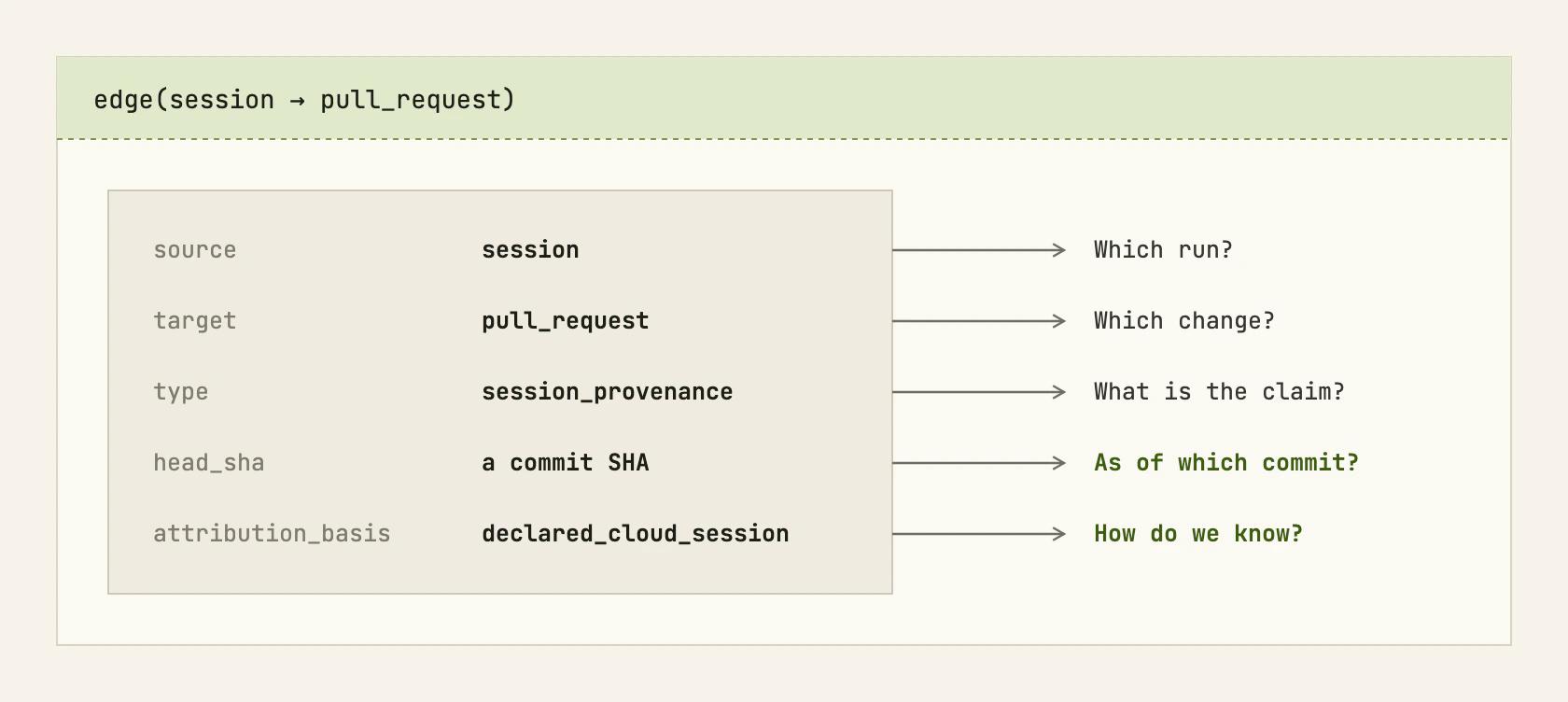
Work that can’t be attributed still has to appear somewhere. Our globe has a product area called Not yet assigned. Agent Insights shows its attribution rate, 80.2% for us this month, and keeps a Non repo work row for sessions with no repository: 678 of them. Without that row, those sessions would either vanish from the totals or get credited to a repository that had nothing to do with them.
How we keep it current
A graph of code goes out of date as the code changes. We didn’t find a single “last updated” time for ours, and sources sync on different schedules. A few things help you judge how fresh it is:
- With Auto Review on Every Commit turned on, a new commit on an open pull request gets a new review.
- Sync timing differs per connector, and a recent event may not appear until its refresh finishes.
- The World Model shows a badge such as “Syncing 51%” while sessions are being analyzed, or when the sync has stalled. Agent Insights prints its age, and ours said “Last indexed 8h ago”.
- Each pattern has a last-seen time, so “P1, 4h ago” and “P1, 4 months ago” don’t look alike.
- Ask Ellie reads only connected systems. Switch one off and its records leave the answers.
You can also filter the globe by time. Set to the last week, ours drops from 460 issues to 46:
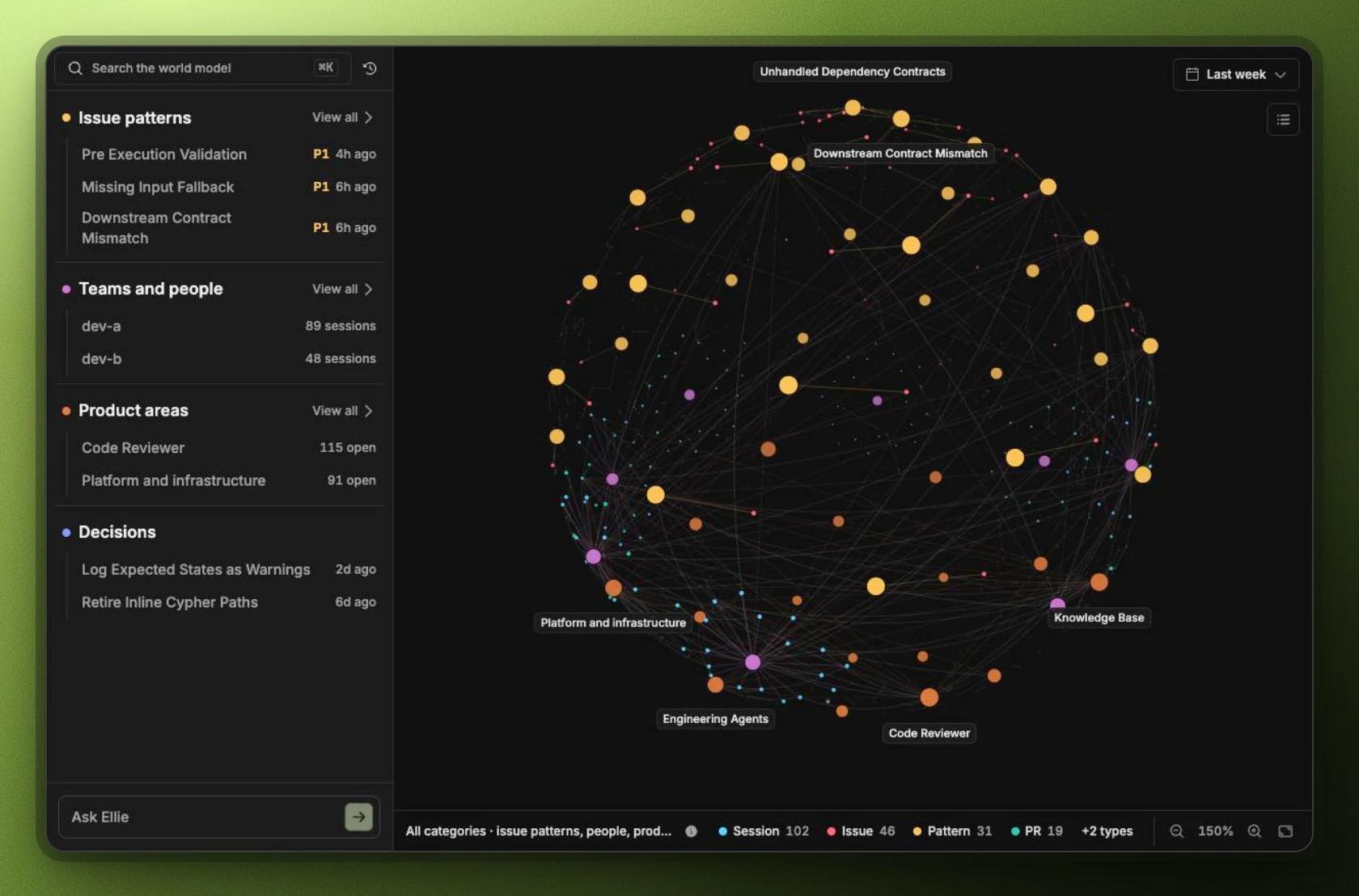
The filter applies to the overview only. Opening a node shows its full history whatever window you picked, so an old cause isn’t hidden by a recent filter.
None of this will tell you that a decision has stopped being true. In the decisions we opened, the state was “active”, and we saw no marker for one that a later decision had replaced. Someone still has to notice that and say so.
How to test whether your graph is current
You can test any graph of your code, ours included, with changes whose answers you already know:
- Pick a file with some history. Write down its last three pull requests, its last failure and one decision about it, using only the source tools.
- Ask the graph for the same facts and compare.
- Merge a small pull request. Note when it appears, and when it is linked to its author and session.
- Rename a file that a decision applies to, then check whether the decision follows it.
- Ask something the graph can’t know. It should say so.
| Measure | What it tells you |
|---|---|
| Correct edges | Of the links you checked, how many the source confirms. |
| Missing edges | Links you knew about that the graph doesn’t have. |
| Time to appear | How long after a merge the change shows up, per connector. |
| Survives a rename | Whether an edge follows the code or stays on a path that is gone. |
| Invented answers | Gaps filled with something plausible. Aim for zero. |
Report missing edges and invented answers separately. A missing edge costs someone a search, while an invented answer can send a change to the wrong place.
How this differs from a code index or a wiki
| World model | Code index | Wiki | |
|---|---|---|---|
| Holds | Code and its history | Definitions, types | What people wrote |
| Link | Typed, across tools | Typed, in code | A hyperlink |
| Good at | Why, who, what next | What calls this | Intent |
| Goes stale | Sync lags, rules replaced | No rebuild | No edits |
For exact references, use a code index. Kythe, for example, builds its graph from compilers and the build system, so it knows definitions and types precisely. A wiki is still the right place for intent that never passed through a pull request.
Questions people ask
Is the World Model just a visualization?
The globe is one way to look at it. Other Entelligence products read the same index, and you can query it through Ask Ellie without opening the globe.
Does it connect every repository automatically?
No. Cross-repository context requires explicit approval, and our docs advise linking codebases only for real dependencies, such as a service and its SDK or an API and its frontend. Data from a connector isn’t automatically shared with every product either.
Why is something I merged today missing?
Check the sync badge and the connector first. Recent events may not appear until a refresh completes. Then check the time window, which your browser remembers.
Is our code used to train models?
No. Customer code is not used to train models.
Want to run the freshness test on your own repo? Book a demo and we will go through it with you.
Sources: Peter Naur, Programming as Theory Building (1985); Kythe overview; Ask Ellie on the World Model; World Model connected globe; Ask Ellie; Ask Ellie permissions; Repositories; Code Review settings; Architecture; Designing an incident-aware review loop.